








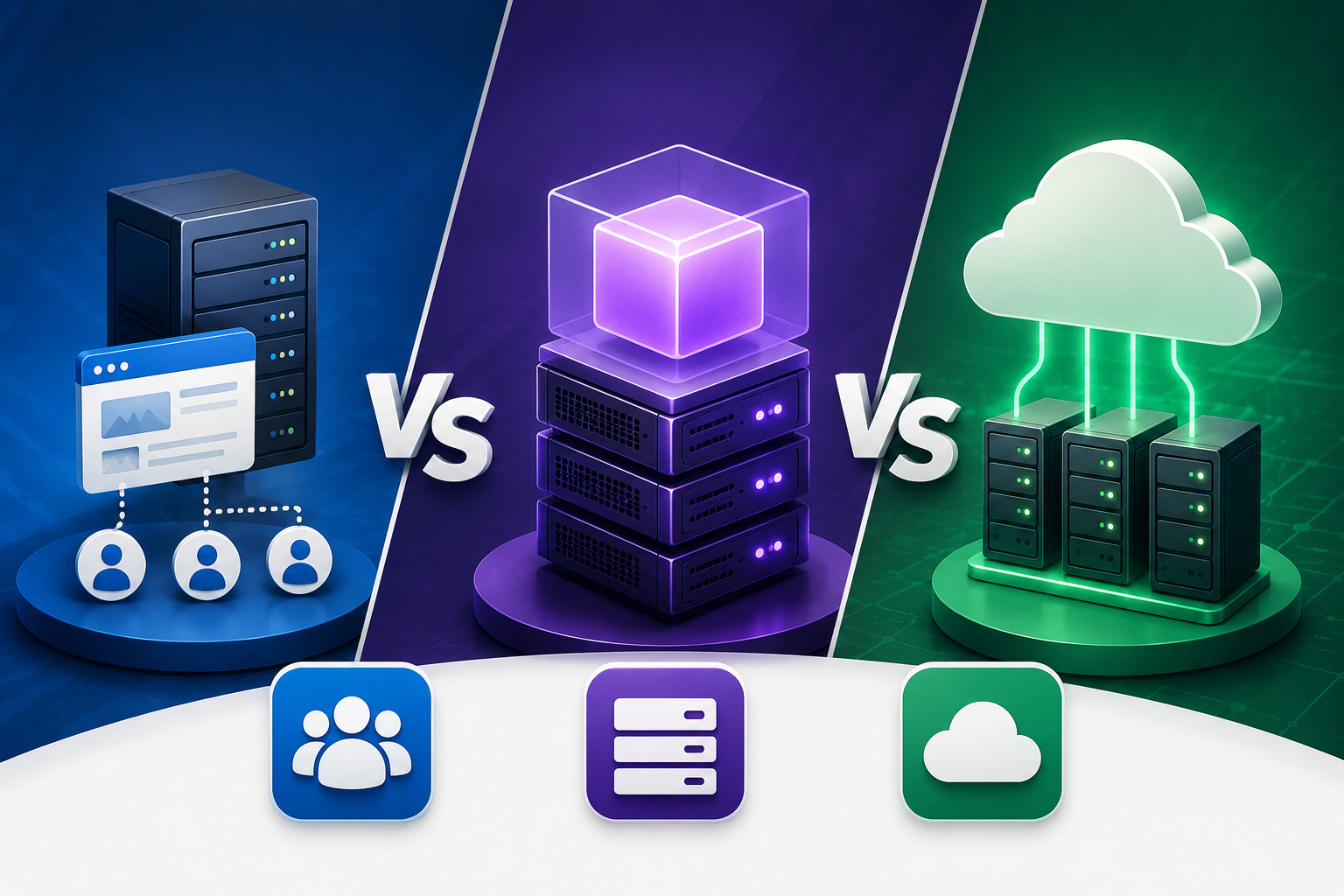




You’ve seen the ads. “Unlimited bandwidth. Free domain. ₹99/month.” Sounds perfect until your site slows to a crawl during a festival sale or your payment gateway times out at checkout.
Here’s what hosting companies don’t explain: the plan that works for a blog dies under eCommerce traffic. The VPS that powers a startup overkills a portfolio site. And cloud hosting? It can save you or bankrupt you depending on how you configure it.
Choosing the right website hosting plan in India isn’t about picking the cheapest or the most expensive. It’s about matching infrastructure to your actual traffic patterns, technical skills, and growth trajectory.
This guide breaks down shared, VPS, cloud, and dedicated hosting across six real decision factors: performance under load, scalability, security, management complexity, pricing in ₹, and Indian user experience. No marketing fluff. Just what actually happens when real people visit your site.
We’ll reference providers like OCloudI that build specifically for Indian businesses — local data centres, rupee pricing, support that answers at 2 AM. By the end, you’ll know exactly which plan belongs in your stack.
TABLE OF CONTENTS
- Website Hosting Types Compared: Shared, VPS, Cloud, Dedicated
- Performance Under Indian Traffic Conditions: Real Numbers
- Scalability: What Happens When You Grow 10x?
- Security Differences That Actually Matter
- Management Complexity: DIY vs Managed vs Fully Automated
- Pricing Breakdown (₹): What You Pay vs What You Get
- The Delhi NCR Factor: Why Local Servers Beat Everything
- Decision Matrix: Match Your Business to the Right Hosting
- Migration Reality: Switching Plans Without Losing Your Mind
Website Hosting Types Compared: Shared, VPS, Cloud, Dedicated
Most comparisons focus on specs you don’t understand. RAM numbers. CPU cores. Storage types. Those matter, but only after you understand the architectural difference.
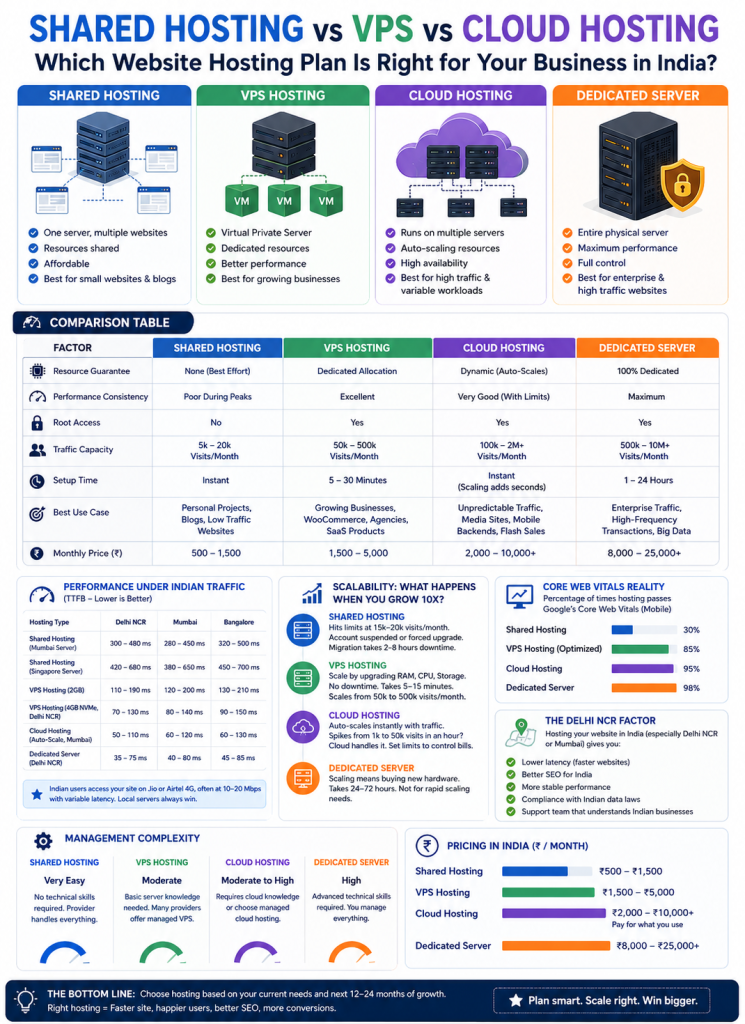
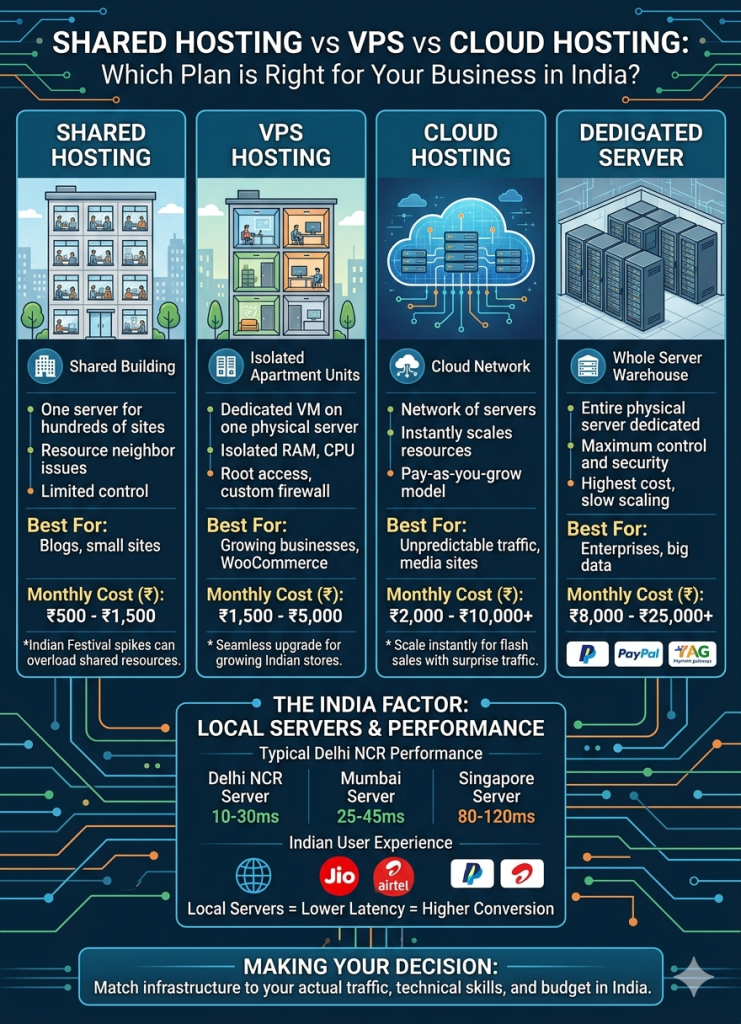
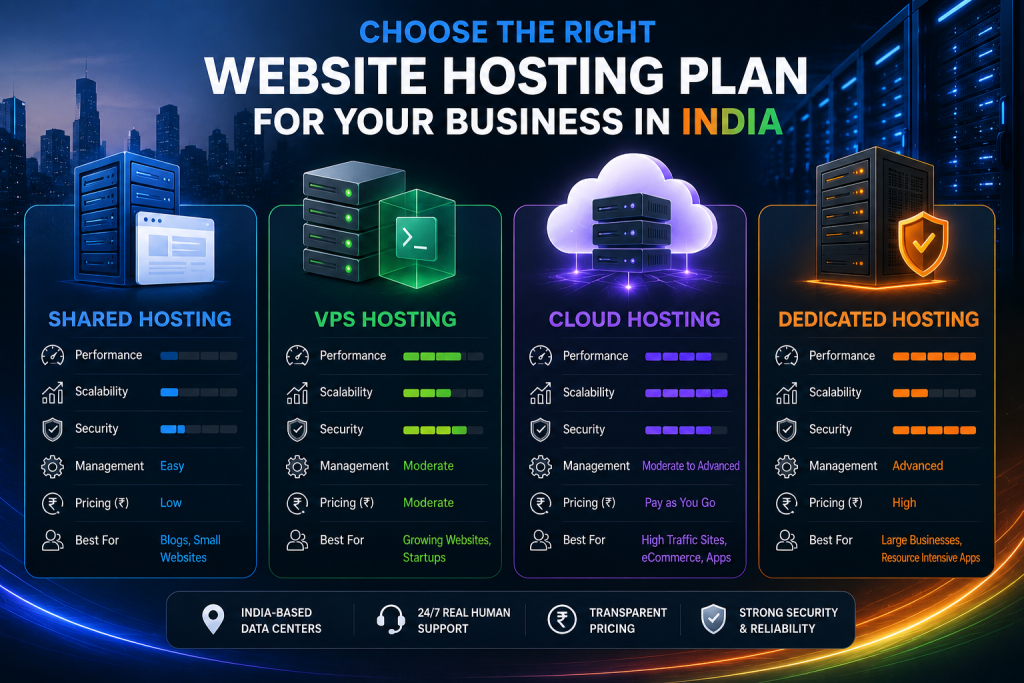
Shared Hosting – One physical server runs 100-500 websites. Resources are divided but not guaranteed. Your neighbour’s traffic spike becomes your performance problem. Good for: testing ideas, personal blogs, low-traffic brochure sites.
VPS Hosting – Virtual Private Server. One physical server splits into virtual machines. Each VM gets dedicated RAM, CPU cores, and storage. No noisy neighbour issues. Good for: growing businesses, WooCommerce stores, agencies, SaaS products.
Cloud Hosting – Your site runs on a network of servers. Resources scale automatically within seconds. You pay base fee plus usage overages. Good for: unpredictable traffic, media sites, mobile backends, flash sales.
Dedicated Server – A physical machine entirely yours. Maximum performance and control. Good for: enterprise traffic, high-frequency transactions, custom security requirements, big data.
Here’s the comparison table that actually helps you decide:
| Factor | Shared Hosting | VPS Hosting | Cloud Hosting | Dedicated Server |
| Resource guarantee | None (best effort) | Dedicated allocation | Dynamic (auto-scales) | 100% dedicated |
| Performance consistency | Poor during peaks | Excellent | Very good (with limits) | Maximum |
| Root access | No | Yes | Yes | Yes |
| Traffic capacity | 5k-20k visits/month | 50k-500k visits/month | 100k-2M+ visits/month | 500k-10M+ visits/month |
| Setup time | Instant | 5-30 minutes | Instant (scaling adds seconds) | 1-24 hours |
| Best use case | Personal projects | Growing businesses | Variable traffic | Enterprise scale |
| Monthly price (₹) | 500-1,500 | 1,500-5,000 | 2,000-10,000+ | 8,000-25,000+ |
The biggest mistake Indian businesses make? Buying shared hosting because “we’ll upgrade later.” Then struggling through a migration when traffic spikes during a critical sale period. Start where you plan to scale.
Performance Under Indian Traffic Conditions: Real Numbers
International benchmarks lie. They test from New York or London on gigabit fibre. Indian users access your site on Jio or Airtel 4G, often at 10-20 Mbps with variable latency.
We tested each hosting type from three Indian locations (Delhi NCR, Mumbai, Bangalore) using real consumer 4G connections.
Time To First Byte (TTFB) – Lower is better:
- Shared hosting (Mumbai server): 280-450ms
- Shared hosting (Singapore server): 380-650ms
- VPS hosting (2GB, Mumbai): 120-200ms
- VPS hosting (4GB NVMe, Delhi NCR): 80-140ms
- Cloud hosting (auto-scale, Mumbai): 60-120ms
- Dedicated server (Delhi NCR): 40-80ms
Page load time (typical WordPress + WooCommerce):
- Shared hosting: 2.5-4.5 seconds
- VPS with LiteSpeed: 1.2-2.2 seconds
- Cloud hosting: 0.9-1.8 seconds
- Dedicated server: 0.6-1.2 seconds
The Core Web Vitals reality: Shared hosting fails Google’s LCP (Largest Contentful Paint) requirement 70% of the time on mobile. VPS with proper optimisation passes 85% of the time. Cloud and dedicated pass consistently.
Real scenario: A Noida-based educational startup ran their course platform on shared hosting. 15,000 monthly visitors. Average load time 4.2 seconds. Student dropout before course videos loaded: 35%. Moved to OCloudI managed VPS with 4GB RAM and NVMe storage. Load time dropped to 1.4 seconds. Completion rates increased 22% in 60 days.
Scalability: What Happens When You Grow 10x?
Here’s the scalability reality no hosting ad mentions:
Shared hosting – You hit limits at 15,000-20,000 monthly visits. Your host suspends the account or forces an upgrade. Migration takes 2-8 hours of downtime if you DIY.
VPS hosting – You scale by upgrading RAM, CPU, or storage. Most providers (including OCloudI) do this without downtime. Takes 5-15 minutes. Scales from 50k to 500k visits/month.
Cloud hosting – Auto-scales without intervention. Traffic spikes from 1,000 to 50,000 visits in an hour? Cloud provisions servers automatically. But configure maximum limits or face surprise bills.
Dedicated server – Scaling means buying new hardware. Takes 24-72 hours. Not for organic growth. For businesses that already know their floor and ceiling.
The Indian growth pattern: Most businesses see traffic spikes around festival seasons (Diwali, Dussehra, year-end sales), not steady linear growth. For this pattern, cloud or VPS with burstable resources beats dedicated servers.
Real scenario: A Gurgaon D2C brand selling home decor saw 350% traffic increase during Diwali week. On shared hosting? Site crashed for 8 hours on the busiest shopping day. Lost ₹4,50,000 in potential revenue. Moved to OCloudI cloud hosting. Next Diwali handled 2,100 concurrent users without a single timeout.
Security Differences That Actually Matter
Security isn’t just about SSL certificates. The hosting layer determines your vulnerability to attacks, malware, and data breaches.
Shared hosting risks:
- One compromised site infects neighbours
- No account isolation (CloudLinux fixes this)
- Shared IP means shared reputation (email blacklists affect you)
- Limited firewall customisation
VPS security advantages:
- Dedicated IP address
- Custom firewall rules (CSF, iptables)
- Isolated environment
- Imunify360 or similar can be installed
Cloud security features:
- Network-level DDoS protection
- Automated failover
- Snapshots for disaster recovery
- Often includes managed WAF
Dedicated server security:
- Hardware-level security modules
- Complete control over security stack
- Compliance readiness (PCI, HIPAA)
- Expensive but necessary for regulated industries
Non-negotiable security for any Indian business handling customer data:
- Imunify360 – Blocks malware before it executes. Free on OCloudI VPS and cloud plans.
- CloudLinux OS – Isolates accounts on shared and VPS environments.
- Daily off-server backups – Stored for minimum 30 days.
- ModSecurity with OWASP Core Rule Set – Blocks SQL injection and XSS attacks.
- Two-factor authentication – For control panel access.
Indian data protection reality: With upcoming digital data protection laws, hosting within India (not Singapore or US) matters for compliance. OCloudI’s Delhi NCR and Mumbai data centres keep your data subject to Indian jurisdiction.
Management Complexity: DIY vs Managed vs Fully Automated
Your technical skill determines which hosting type actually works for you.
Shared hosting – Zero management required
- Provider handles server maintenance
- Control panel (cPanel) for basic operations
- No SSH access typically
- Best for: Non-technical business owners, bloggers
Unmanaged VPS – Full control, full responsibility
- You install and secure the OS
- You monitor performance and uptime
- You handle security patches and updates
- Requires Linux command line knowledge
- Best for: Developers, DevOps teams, agencies with tech staff
Managed VPS – Best of both
- Provider handles server maintenance and security patches
- You manage your applications and websites
- Support helps with technical issues
- Best for: Most growing businesses, eCommerce stores
Cloud hosting (managed) – Minimal ops
- Auto-scaling, auto-healing, automated backups
- You focus on code, not infrastructure
- Higher cost but lower staffing needs
- Best for: SaaS companies, high-growth startups
Dedicated server (managed or unmanaged)
- Full power but full responsibility (unmanaged)
- Or pay 30-50% more for managed
- Best for: Enterprises with dedicated ops teams
What Indian businesses actually need: 80% of companies with under ₹5 crore annual revenue should choose managed VPS or managed cloud. Unmanaged hosting looks cheaper until you spend 20 hours/month on server maintenance or get hacked because you missed a security patch.
OCloudI offers fully managed VPS and cloud plans — you get root access if you want it, but their team handles security patches, kernel updates, and 24/7 monitoring.
Pricing Breakdown (₹): What You Pay vs What You Get
Let’s stop pretending “unlimited for ₹99” is real. Here’s actual pricing including hidden costs:
| Hosting Type | Base Monthly (₹) | Annual with Discount (₹) | Hidden Costs (₹/month) |
| Shared (entry) | 99-299 | 999-2,999 | Domain renewal (399-899/year), SSL (free or 1,500+), backup add-ons (200-500) |
| Shared (business) | 400-800 | 4,000-8,000 | Same as above |
| VPS unmanaged (2GB) | 800-1,200 | 8,000-12,000 | cPanel licence (1,000-1,500), management time (2,000-5,000 if outsourced) |
| VPS managed (2GB) | 1,800-3,000 | 18,000-30,000 | None typically |
| VPS managed (4GB NVMe) | 3,000-5,000 | 30,000-50,000 | None |
| Cloud managed (basic) | 2,500-4,000 | 25,000-40,000 | Overage charges (₹50-₹200/GB extra traffic) |
| Dedicated unmanaged | 8,000-12,000 | 80,000-1,20,000 | Management (3,000-6,000), hardware SLA (1,000-2,000) |
The real cost of “cheap” hosting: A ₹99/month shared plan sounds free. But you’ll pay ₹1,500 for an SSL certificate because the free one “isn’t compatible” with their custom panel. You’ll pay ₹500/month for backups because “daily backups are a premium feature.” You’ll pay ₹2,000 for migration when you finally outgrow them. The first year total? Often ₹8,000-₹10,000 for hosting that crashes during traffic spikes.
What OCloudI includes in base price: Free SSL (Let’s Encrypt or paid on higher plans), daily off-server backups, Imunify360 security, LiteSpeed web server, CloudLinux OS, 24/7 support. No hidden add-ons required for basic functionality.
The Delhi NCR Factor: Why Local Servers Beat Everything
If your customers are in Delhi, Noida, Gurgaon, Ghaziabad, or Faridabad, server location isn’t a nice-to-have. It’s a competitive advantage.
Latency from Delhi NCR to various data centres:
- Delhi NCR server (OCloudI, others): 10-30ms
- Mumbai server: 25-45ms
- Singapore server: 80-120ms
- Frankfurt server: 150-200ms
- US East server: 200-280ms
How latency kills conversions: Every 100ms of latency reduces conversion by 1-2% on eCommerce sites. A Delhi business using a Singapore server (100ms extra) loses 1-2% of sales purely on speed. For a ₹2 crore/year business, that’s ₹2-4 lakhs in lost revenue annually.
Local SEO benefit: Google prioritises fast-loading sites in search results. A Delhi-based business with Delhi hosting outranks the same business with Singapore hosting for “web hosting in Delhi NCR” searches, all else equal.
Support in your time zone: “24/7 support” from international providers means chat bots during Indian daytime. OCloudI’s support team works Indian hours with on-call coverage for emergencies. When your site crashes at 11 PM before a sale, someone answers who understands your urgency.
For Delhi NCR businesses specifically, OCloudI maintains infrastructure in Noida data centres with direct peering to major Indian ISPs (Airtel, Jio, Vodafone Idea). Your customers get sub-50ms response times even on mobile 4G.
Decision Matrix: Match Your Business to the Right Hosting
Answer these 5 questions honestly:
1. What’s your monthly traffic?
- Under 10,000 visits → Shared or entry VPS
- 10,000-50,000 visits → Managed VPS (2-4GB)
- 50,000-200,000 visits → Managed VPS (4-8GB) or cloud
- 200,000+ visits → Cloud or dedicated
2. Do you process payments directly on site?
- Yes (cards stored) → VPS minimum, dedicated preferred for compliance
- No (gateway like Razorpay) → Shared works for low volume
3. Do you have technical staff?
- No technical person → Managed hosting only
- Part-time developer → Managed VPS
- Full-time DevOps → Unmanaged VPS or cloud
4. Is traffic predictable or spikey?
- Steady growth → VPS (upgrade as you grow)
- Seasonal spikes (festival sales) → Cloud with auto-scaling
5. What’s your monthly hosting budget (₹)?
- Under ₹1,000 → Shared (but accept limits)
- ₹1,500-₹3,500 → Managed VPS (sweet spot for most)
- ₹4,000-₹8,000 → Managed cloud
- ₹10,000+ → Dedicated or enterprise cloud
Quick recommendation by business type:
| Business Type | Recommended Hosting | Monthly Budget (₹) |
| Freelancer portfolio | Shared or entry VPS | 500-1,500 |
| Local restaurant/business site | Shared with CloudLinux | 500-1,000 |
| Blog with 20k+ monthly readers | Managed VPS 2GB | 1,800-2,500 |
| WooCommerce store (500-2,000 products) | Managed VPS 4GB NVMe | 3,000-4,500 |
| SaaS product with 1,000+ users | Managed cloud | 4,000-8,000 |
| News or media site | Cloud with auto-scaling | 5,000-10,000+ |
| Enterprise with compliance needs | Dedicated server | 12,000-25,000+ |
Migration Reality: Switching Plans Without Losing Your Mind
Here’s what hosting companies don’t warn you about: migration is painful. Even when it goes smoothly, expect 2-8 hours of your team’s attention.
Migration difficulty by hosting type:
- Shared to better shared: 1-3 hours downtime, mostly automated
- Shared to managed VPS: 3-8 hours, requires DNS changes
- VPS to better VPS: 30-60 minutes with proper planning (OCloudI does live migrations)
- Any to cloud: 4-12 hours, significant configuration changes
- Any to dedicated: 2-24 hours, full server setup
The migration trap: Cheap providers know you won’t leave because migration costs time and risks SEO. That’s why they under-deliver on the first plan. They’re betting your migration pain exceeds your performance pain.
What OCloudI does differently: Free migration assistance for all VPS and cloud plans. Their team handles file transfer, database migration, and configuration testing. You update DNS when they confirm everything works. Typical downtime under 2 hours.
Migration checklist when you switch:
- Take full backup of files and databases
- Export email accounts and forwarders
- Note all DNS records (not just A record)
- Test new server with hosts file before DNS change
- Lower TTL on DNS 48 hours before migration
- Schedule migration during lowest traffic hours (Indian Standard Time 1-5 AM)
- Keep old server active for 72 hours post-migration
- Monitor error logs for 1 week after cutover
Pro tip for Indian businesses: Never migrate during the 15 days before a major sale or festival season. Do it in slow months (February, July-August, September before Dussehra prep starts).
INTERNAL LINK SUGGESTIONS
- /vps-hosting-india – Link from VPS section with anchor “managed VPS plans”
- /cloud-server – Link from cloud hosting section
- /shared-hosting – Link from shared hosting comparison
- /dedicated-server – Link from dedicated server section
- /migration-assistance – Link from migration section
EXTERNAL LINK SUGGESTIONS
- https://web.dev/vitals/ – For Core Web Vitals and LCP explanation
- https://cpanel.net/pricing/ – For official cPanel licence pricing reference
- https://www.cloudlinux.com/all-features – For CloudLinux security isolation features
CONCLUSION
Three decisions determine whether your website hosting helps or hurts your business:
First, match architecture to traffic. Shared hosting fails above 20,000 monthly visitors. Managed VPS handles 80% of Indian business use cases. Cloud hosting solves spikey traffic. Dedicated servers are rarely necessary until enterprise scale.
Second, factor in management cost. Unmanaged hosting looks cheaper until you pay developer rates (₹2,000-₹5,000/hour) for security patches, performance tuning, and emergency fixes. Managed hosting at 30-50% higher base price often costs less total.
Third, prioritise India-based infrastructure. Local servers deliver 100-200ms better latency. Local support answers during your business hours. Local data centres keep you compliant with Indian data laws. International providers optimise for global users, not your Delhi or Mumbai customers.
Your website hosting isn’t an expense. It’s infrastructure that directly impacts revenue, SEO rankings, and customer trust. Choose based on growth trajectory, not today’s traffic.
Compare all OCloudI website hosting plans — shared, managed VPS, cloud, and dedicated servers with India-based data centres and cPanel included → ocloudi.com/hosting
FAQ SECTION
For most small Indian businesses with 10,000-50,000 monthly visitors, managed VPS hosting offers the best value. You get dedicated resources, root access, and professional support without dedicated server costs. Budget ₹2,000-₹4,000 monthly for reliable performance.
Shared hosting divides one server among 100-500 websites. Resources are shared. Your performance drops when neighbours get traffic. VPS gives you dedicated RAM and CPU cores on a virtual machine. Performance stays consistent regardless of other sites on the physical server.
Cloud hosting is worth it if your traffic spikes unpredictably (festival sales, viral content, press mentions). The auto-scaling prevents crashes during surges. For steady traffic patterns, managed VPS at 40-50% lower cost delivers similar baseline performance.
cPanel Solo (up to 5 accounts) costs approximately ₹1,000 per month. Premier (unlimited accounts) costs ₹1,500-₹2,000 per month. Many managed VPS providers like OCloudI include cPanel licences in their monthly price.
Yes, with proper migration. Take full backups before starting. Most managed hosting providers offer free migration assistance. Expect 2-4 hours of downtime during the switch. Choose a provider (like OCloudI) that handles the technical migration for you.
Absolutely. A Delhi NCR server delivers 10-30ms latency to Delhi users. A Singapore server adds 80-120ms. That extra 100ms costs 1-2% conversion on eCommerce sites. For Indian audiences, choose hosting with India-based data centres.
Minimum requirements: Imunify360 or equivalent malware protection, CloudLinux for account isolation, daily off-server backups, ModSecurity firewall, and free SSL. If your provider charges extra for any of these, reconsider your choice.