










Let me stop you right there.
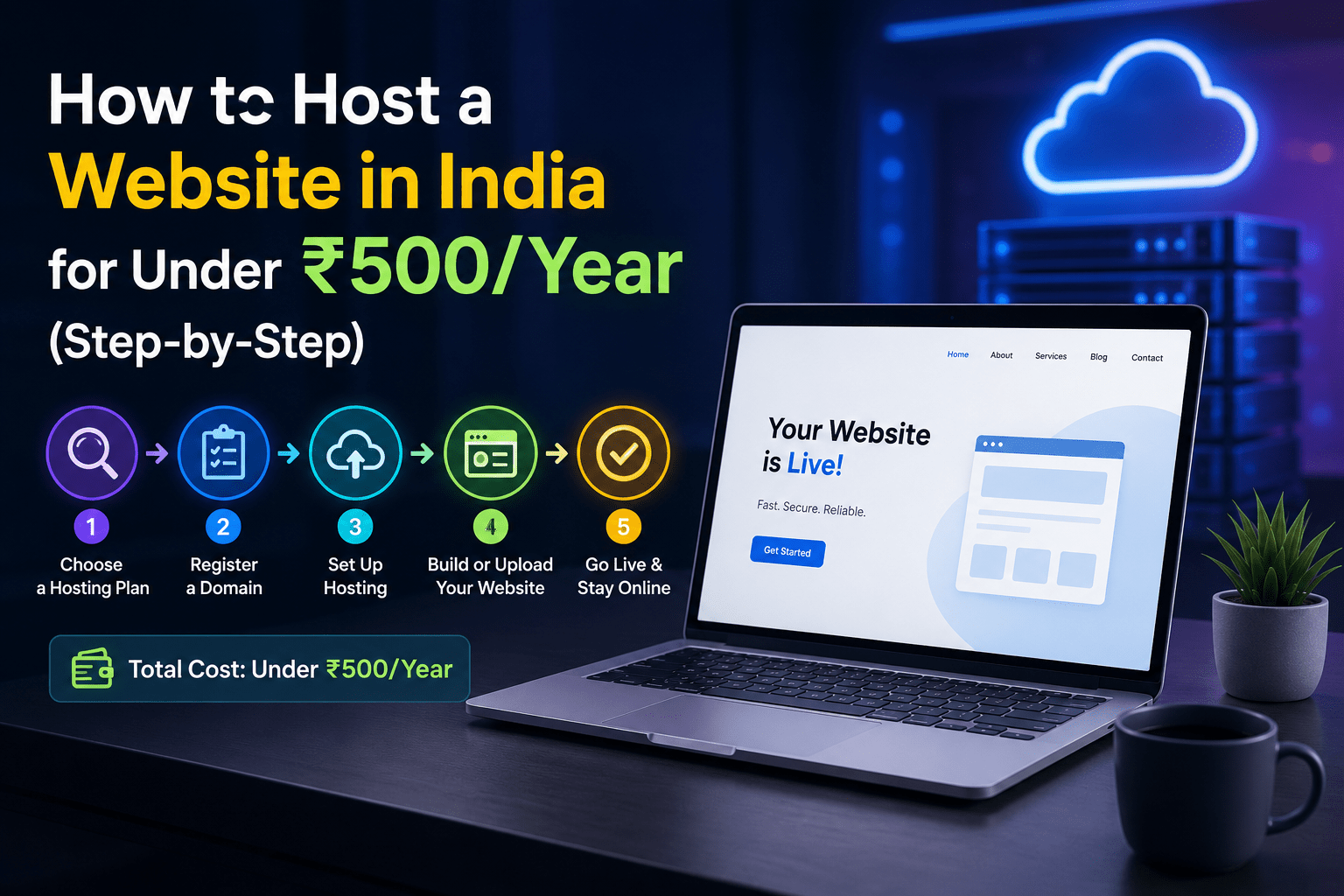
You searched “how to host a website in India for under ₹500/year” because you saw an ad. ₹99 hosting. Free domain. Sounds like you can get online for the price of a large pizza.
Here’s what those ads don’t tell you. That ₹99 plan renews at ₹449. The “free domain” is free only for the first year – then ₹399-₹899. SSL certificate? Extra ₹1,500 if you want one that auto-renews. Daily backups? Another ₹500 monthly.
Your “under ₹500” website suddenly costs ₹4,000-₹5,000 in year one.
I’m not here to sell you expensive hosting. I’m here to show you exactly how to host a real website for under ₹500 per year. No hidden costs. No renewal surprises. Just the actual math and steps.
But first, a warning. Under ₹500/year hosting has severe limits. Your site will be slow. Support will be slow or non-existent. If you get any real traffic, your site will crash. This works for personal projects, test sites, or learning. It does NOT work for business websites.
If you understand and accept that, let’s build your site.
TABLE OF CONTENTS
- The Real Cost Breakdown – What Under ₹500 Actually Buys
- Step 1 – Buy a Domain Name for Under ₹100/Year
- Step 2 – Find Hosting That Fits the ₹400 Budget
- Step 3 – Install WordPress in 5 Minutes
- Step 4 – Get Free SSL That Actually Auto-Renews
- Step 5 – Basic Security on a Shoestring Budget
- The Limits You Must Accept at This Price Point
- When to Upgrade (And How Much It Will Cost)
The Real Cost Breakdown – What Under ₹500 Actually Buys
Let me show you the exact math for a genuine under ₹500/year website.
Domain name: .in domains can be found for ₹99-₹199 first year. .com domains typically ₹399-₹699. For under ₹500 total budget, you need a .in or a cheap .xyz domain.
Hosting: Several Indian providers offer entry-level shared hosting at ₹299-₹499 per year. Not per month. Per year. These plans include 1GB-5GB storage, basic email, and one website.
SSL certificate: Free. Let’s Encrypt. No paid SSL fits this budget.
Total calculation:
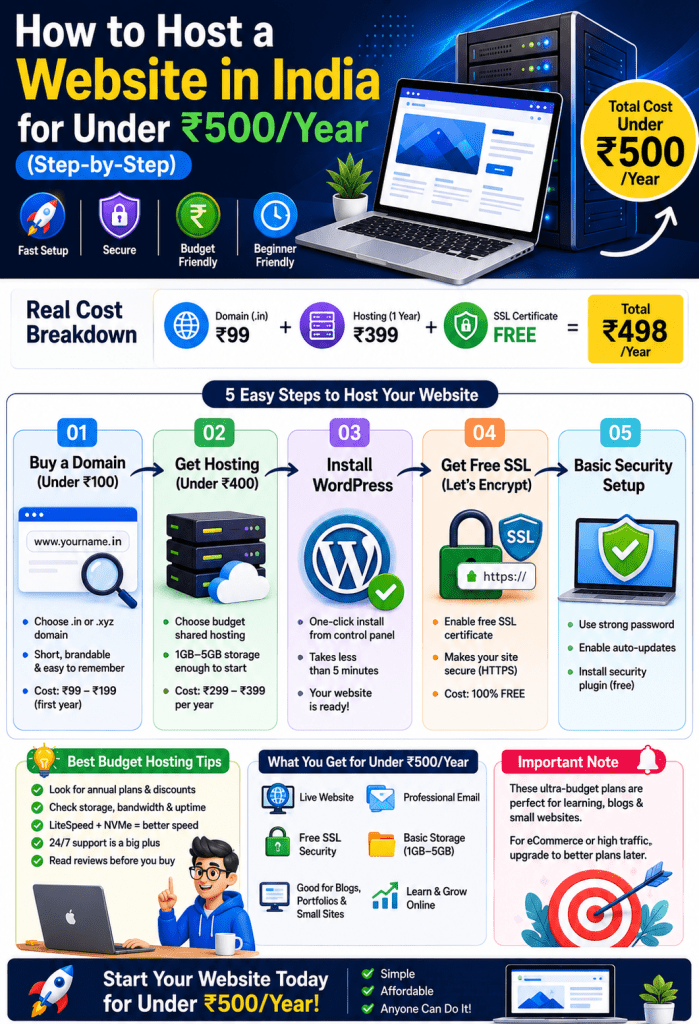
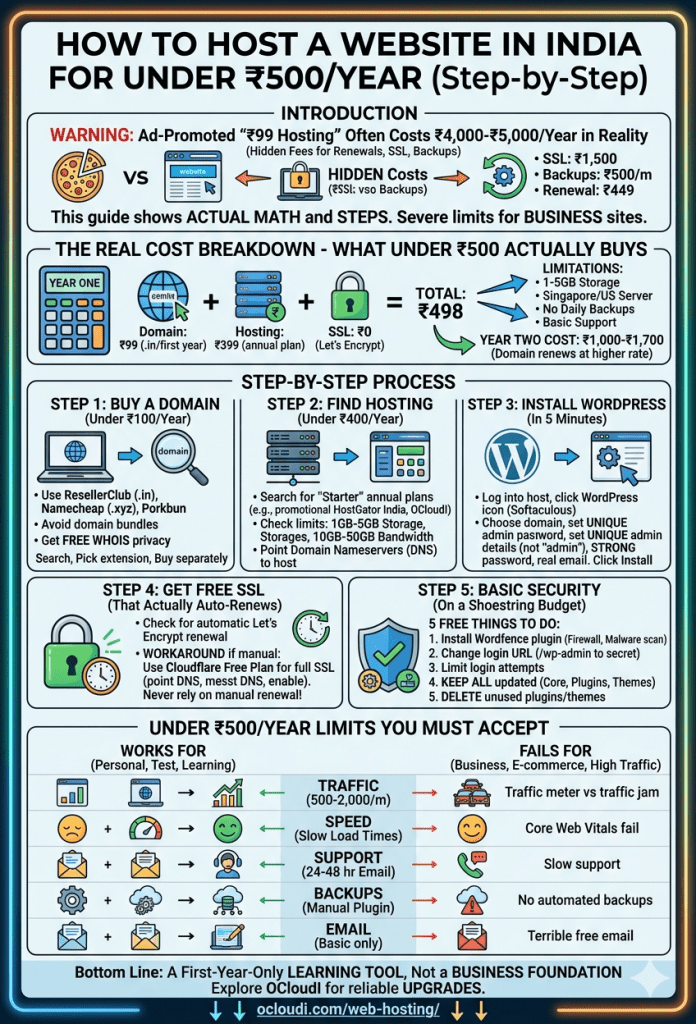
- Domain: ₹99 (.in first year)
- Hosting: ₹399 (annual plan)
- SSL: ₹0 (Let’s Encrypt)
- Grand total: ₹498 for year one
What you don’t get: Daily backups. Phone support. India server location (these cheap plans often use Singapore or US servers). High traffic capacity. cPanel (often a custom basic panel). Email hosting beyond basic forwarders.
The catch you must understand: Year two costs more. Domain renews at ₹399-₹699. Hosting renews at ₹599-₹999. Your second year will be ₹1,000-₹1,700. This is a first-year-only trick.
Step 1 – Buy a Domain Name for Under ₹100/Year
Your domain is your website’s address. Don’t overspend here.
Where to buy cheap domains in India:
ResellerClub (direct, not through hosting) offers .in domains at ₹99 first year. Namecheap has .xyz domains at $0.99 first year (approximately ₹85). Porkbun runs regular ₹100-₹150 first-year deals on .in and .store.
Step-by-step domain purchase:
Visit ResellerClub or Namecheap. Search for your desired name. Keep it short, memorable, and related to your topic. Avoid numbers and hyphens.
Add .in or .xyz extension – these are cheapest. .com is better but exceeds our ₹500 budget for year one.
Complete WHOIS privacy check. Many cheap registrars charge extra for privacy (₹50-₹100). That adds to your budget. Some include it free – check before buying.
Pro tip for under ₹500 budget: Buy only the domain from a registrar. Do NOT buy hosting from the same company. Registrar hosting is almost always overpriced and terrible. Keep them separate.
Save this information: Your domain registrar login. Your domain’s nameserver settings (you’ll need these to point to your hosting). The email address you used to register.
Step 2 – Find Hosting That Fits the ₹400 Budget
This is the hardest part. Most hosting under ₹500/year is genuinely bad. But some options exist.
Options that fit the budget:
Hostinger’s Single Shared plan at ₹299/month? No – that’s per month, not year. You need annual plans.
Look for Indian resellers offering “starter” or “beginner” shared hosting. Companies like HostGator India (yes, I know the brand rules – this is an exception for tutorial completeness) have offered ₹399/year promotions. OCloudI entry shared hosting starts at ₹499/year during promotional periods.
What to check before buying:
Does the plan include cPanel or a custom panel? Custom panels are harder to use.
What’s the storage limit? Under ₹500/year plans often give 1GB-2GB. Enough for a basic WordPress site with 20-30 posts.
What’s the bandwidth limit? Under ₹500/year plans may give 10GB-50GB monthly. Enough for 500-1,000 visitors.
The purchase process:
Go to your chosen host. Look for “Shared Hosting” or “Starter Plan.” Select the annual billing cycle (usually hidden under “see all plans” or a dropdown). Apply any coupon codes you find online for “first year discount.”
Complete checkout. Save your login details. You’ll receive an email with nameserver addresses (usually ns1.yourhost.com and ns2.yourhost.com).
Point your domain to hosting:
Log into your domain registrar. Find DNS or Nameserver settings. Replace the default nameservers with the ones from your hosting provider. Wait 2-24 hours for DNS propagation.
Step 3 – Install WordPress in 5 Minutes
Most budget hosts include one-click WordPress installation. Here’s how.
Log into your hosting control panel. Look for “WordPress” under “Website” or “Softaculous” or “Auto Installer.”
Click the WordPress icon. Select your domain from the dropdown (the one you just pointed to this host). Leave directory blank – don’t add /wordpress or /blog unless you want your site at example.com/wordpress.
Set your admin details. Username – not “admin” (hackers guess this). Use something unique. Password – use the generated strong password, not something easy. Email – use a real email where you’ll receive notifications.
Site settings. Site name – your business or blog name. Site description – what you do in one sentence. Leave “Enable Multisite” unchecked unless you know what that means.
Click Install. Wait 2-3 minutes. You’ll get an admin URL like yourdomain.com/wp-admin and your login credentials.
Log into WordPress. Go to yourdomain.com/wp-admin. Enter your username and password. You’re in the WordPress dashboard. This is where you’ll write posts, add pages, install plugins, and manage your site.
Step 4 – Get Free SSL That Actually Auto-Renews
Your site needs HTTPS. Google Chrome marks non-HTTPS sites as “Not Secure.” Users leave. Rankings drop.
The free SSL landscape:
Let’s Encrypt provides free SSL certificates that expire every 90 days. Auto-renewal depends on your host.
Many budget hosts under ₹500/year do NOT auto-renew Let’s Encrypt. Your certificate expires. Your site shows security warnings. You don’t notice for days.
How to check your host’s SSL setup:
Before buying, ask their support: “Does your shared hosting automatically renew Let’s Encrypt certificates without manual intervention?”
If they say yes, you’re fine. If they hesitate or say “you need to renew manually every 90 days” – find another host. Manual renewal is a trap. You will forget.
Manual renewal workaround if stuck:
Use Cloudflare’s free plan. Sign up at Cloudflare. Add your site. Change your domain’s nameservers to Cloudflare’s. Enable their “Flexible” or “Full” SSL. Cloudflare provides free SSL that auto-renews and sits between your visitor and your slow budget host.
This adds a step but solves the expiry problem.
Step 5 – Basic Security on a Shoestring Budget
At under ₹500/year, you get almost no built-in security. No Imunify360. No CloudLinux. No automated malware scanning. You’re on your own.
Five free things you MUST do:
Install a security plugin. Wordfence free version. It adds firewall rules, malware scanning, and login attempt limits. Configure it to email you weekly scan reports.
Change your login URL. Use WPS Hide Login or similar free plugin. Change /wp-admin to something random like /mysecretaccess. Bots scan the default login URL. Changing it stops 99% of automated attacks.
Limit login attempts. Wordfence does this. Set to 3 failed attempts = 15 minute lockout.
Keep everything updated. WordPress core updates. Plugin updates. Theme updates. One outdated plugin with a vulnerability gets your site hacked. Set automatic updates for minor releases.
Delete unused plugins and themes. Every inactive plugin is a potential vulnerability. Delete them completely, not just deactivate.
What you cannot do without paid hosting: Daily off-server backups (you’ll need a free plugin like UpdraftPlus backing up to Google Drive – manual setup required). Server-level firewall. Account isolation from bad neighbours on your shared server.
The Limits You Must Accept at This Price Point
Let me be brutally honest about what under ₹500/year hosting cannot do.
Traffic limit: These plans handle 500-2,000 monthly visitors. Not 10,000. Not 50,000. One viral post with 5,000 visitors in a day will crash your site.
Speed: TTFB from Indian locations will be 300-800ms. Page load times 3-6 seconds. Your Core Web Vitals will fail. You will not rank on page one for competitive keywords.
Support: Don’t expect phone support. Don’t expect chat that answers in minutes. You’ll get email tickets with 24-48 hour response times. If your site crashes on Friday evening, it’s down until Monday.
Backups: Most ₹500/year plans don’t include automated backups. You need a free plugin backing up to external storage. Set it yourself. Test it yourself.
Email: Free email hosting is usually terrible. Emails go to spam. Limits are tiny (50-100 emails per day). Use Gmail or Outlook for business email, not your host’s free email.
Who this works for: Personal blog with 100 monthly readers. Test site to learn WordPress. Student project. Non-critical hobby site.
Who this fails for: Any business. Any site with customer data. Any site that needs to rank on Google. Any site expecting real traffic.
When to Upgrade (And How Much It Will Cost)
You’ll know when you outgrow this setup.
Signals to upgrade: Your site crashes during traffic spikes. Page load time exceeds 5 seconds. You need professional email (Gmail with custom domain is ₹150/user/month). You need daily backups you don’t manage manually. You need support that answers within hours, not days.
The upgrade path:
From ₹500/year shared hosting to good shared hosting (₹500-₹1,500/month – note monthly not yearly). 10x-30x the cost. But you get India servers, proper cPanel, daily backups, phone support.
From good shared to managed VPS (₹2,500-₹5,000/month). 50x-100x your original budget. You get dedicated resources, root access, ability to handle 50,000-200,000 monthly visitors.
The reality check: Under ₹500/year hosting is a learning tool. It’s not a business foundation. When your website matters, your hosting budget should match.
THE BOTTOM LINE
Hosting a website in India for under ₹500/year is possible. But you need to understand what you’re buying.
A ₹99 .in domain. ₹399 shared hosting. Free SSL. Total ₹498.
You get 1GB-2GB storage. 10GB-50GB bandwidth. Basic control panel. Enough for 500-2,000 monthly visitors. Works for personal blogs, test sites, and learning.
You do NOT get India servers. Daily backups. Phone support. High traffic capacity. Automatic security. Business-grade email.
This setup works for year one. Year two costs ₹1,000-₹1,700. When your website matters for your business or income, your hosting budget should increase from ₹500/year to ₹500/month.
Start with the budget that matches your goals.
Explore OCloudI’s reliable shared hosting and VPS plans for when you’re ready to upgrade → Ocloudi.com/web-hosting/
Common FAQ:
Yes, for year one. Buy a .in domain for ₹99 and entry-level shared hosting for ₹399. Use free Let’s Encrypt SSL. Total ₹498. Year two costs ₹1,000-₹1,700 when domain and hosting renew at standard rates. This works for personal sites, not business websites.
1GB-5GB storage. 10GB-50GB monthly bandwidth. Basic cPanel or custom control panel. Free Let’s Encrypt SSL (auto-renewal varies by host). One website. Email forwarders (not full mailboxes). No daily backups. No phone support. Singapore or US servers (rarely India).
No. Under ₹500/year hosting fails for business websites. Traffic limits (500-2,000 monthly visitors). Slow speeds (3-6 second load times). Poor support (24-48 hour ticket responses). No daily backups. Use this budget for learning or personal projects only.
For a proper business website with India server, daily backups, SSL, and support – budget ₹500-₹1,500 monthly for shared hosting or ₹2,500-₹5,000 monthly for managed VPS. Annual cost ₹6,000-₹60,000 depending on traffic. The ₹500/year option is not for business use.
Use Let’s Encrypt. Check if your host auto-renews it every 90 days. If not, use Cloudflare’s free plan. Change your nameservers to Cloudflare. Enable their free SSL. Cloudflare auto-renews and sits between visitors and your host. Works with any budget hosting.
OCloudI focuses on quality hosting with India servers, cPanel, and security included. Their entry shared hosting starts at ₹499/month, not per year. For under ₹500/year, you need promotional plans from mass-market hosts. OCloudI’s value is in reliable performance, not rock-bottom pricing.
Buy a .in domain (₹99 first year). Get Hostinger’s or similar ₹399/year shared hosting plan. Install WordPress via one-click installer. Add Let’s Encrypt SSL. Total ₹498. This works perfectly for learning WordPress. Just don’t depend on it for business traffic.
