













Choosing the right web hosting is one of the most important decisions for any website owner. Whether you are starting a blog, running an online store, or managing a business website, your hosting directly impacts speed, security, and user experience.
Many users get confused between shared hosting, VPS hosting, cloud hosting, and dedicated hosting. Each type serves a different purpose and choosing the wrong one can lead to performance issues or unnecessary costs.
In this guide, you will clearly understand how each hosting type works, when to use it, and how to select the best option based on your needs.
What is Web Hosting?
Web hosting is a service that stores your website data on a server and makes it accessible on the internet. When someone visits your website, the server delivers your content to their browser.
Why Choosing the Right Hosting Type Matters
The type of hosting you choose can directly affect your website’s performance, growth, and revenue. A poor hosting decision often leads to slow speed, downtime, and lost customers, while the right choice ensures stability and scalability.
Before selecting any hosting, it is important to understand what benefits the right hosting can bring to your website and business.
- Faster website loading speed improves user experience and SEO rankings
- Better uptime ensures your website is always accessible
- Strong security protects your data and user information
- Scalability allows your website to grow without interruptions
Types of Web Hosting Explained
Shared Hosting
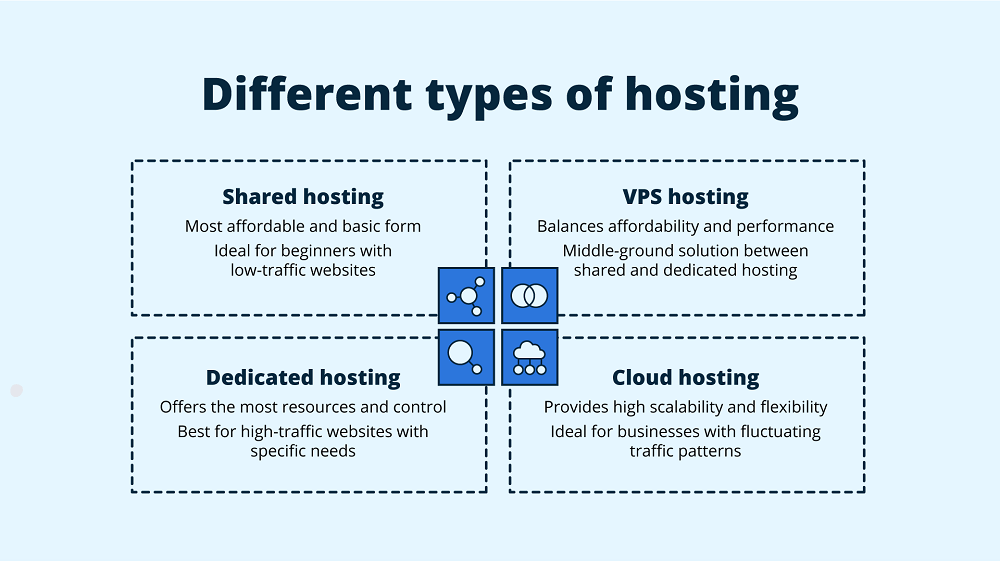
Shared hosting is the most basic and affordable type of web hosting where multiple websites share the same server resources.
Before choosing shared hosting, it is important to understand how it works and what kind of websites it is best suited for. This hosting is commonly used by beginners and small website owners.
- Multiple websites are hosted on a single server
- Server resources like CPU, RAM, and storage are shared
- Managed by the hosting provider
- Includes features like control panel, email hosting, and free SSL certificate
Best Use Cases
Shared hosting is suitable for users who are just starting out or running small websites with limited traffic. It is cost-effective and easy to manage, making it ideal for non-technical users.
- Personal blogs and portfolios
- Small business websites
- Static or low-traffic websites
Limitations
While shared hosting is affordable, it comes with certain performance and control limitations. Understanding these limitations will help you decide when to upgrade to a better hosting solution.
- Limited performance during high traffic
- Less control over server settings
- Resource sharing can affect speed
VPS Hosting
VPS hosting (Virtual Private Server) offers a more powerful and flexible solution compared to shared hosting. It provides dedicated resources within a shared environment, making it a popular choice for growing websites.
Before selecting VPS hosting, you should understand how it improves performance and what level of control it provides compared to basic hosting options.
- A physical server is divided into multiple virtual servers
- Each VPS gets dedicated CPU, RAM, and storage
- Offers root access and customization
- Available as managed VPS hosting and unmanaged VPS hosting
Best Use Cases
VPS hosting is suitable for websites that have outgrown shared hosting and require better speed, control, and scalability. It is widely used by developers and businesses.
- Growing business websites
- eCommerce platforms
- Applications requiring better performance
- Developers needing customization
Limitations
Although VPS hosting offers better performance, it also requires more technical understanding, especially in unmanaged environments. Cost is also higher compared to shared hosting.
- Higher cost than shared hosting
- Technical knowledge required for unmanaged VPS
- Server management responsibilities
Cloud Hosting
Cloud hosting is a modern hosting solution that uses multiple interconnected servers to deliver better performance, uptime, and scalability. It is widely used by startups and growing businesses.
To understand cloud hosting properly, you should know how it distributes resources and why it is more reliable than traditional hosting methods.
- Uses multiple servers instead of a single server
- Resources are distributed across a network
- Offers high uptime and reliability
- Supports scalable and flexible pricing models
Best Use Cases
Cloud hosting is ideal for businesses that expect traffic growth or need flexibility in resource usage. It is especially useful for applications that cannot afford downtime.
- Startups and SaaS platforms
- High-traffic websites
- eCommerce websites
- Scalable business applications
Limitations
Cloud hosting provides flexibility but may involve complex pricing and setup. Understanding these limitations helps in making better decisions.
- Pricing can vary based on usage
- Slightly complex for beginners
- Requires proper configuration
Dedicated Hosting
Dedicated hosting provides a complete physical server dedicated to a single user. It offers the highest level of performance, control, and security among all hosting types.
Before choosing dedicated hosting, it is important to evaluate whether your website truly requires such high resources and control.
- One server dedicated to a single website
- Full control over server configuration
- Maximum performance and security
- No resource sharing
Best Use Cases
Dedicated hosting is designed for large-scale businesses and applications that require maximum performance and security.
- Enterprise-level websites
- High-traffic platforms
- Applications with strict security requirements
Limitations
While dedicated hosting offers unmatched performance, it comes with higher costs and management complexity.
- Expensive compared to other hosting types
- Requires technical expertise
- Not suitable for beginners
Shared vs VPS vs Cloud vs Dedicated (Comparison Table)
| Feature | Shared Hosting | VPS Hosting | Cloud Hosting | Dedicated Hosting |
| Cost | Low | Medium | Flexible | High |
| Performance | Basic | Good | High | Very High |
| Scalability | Limited | Moderate | Excellent | Limited |
| Control | Low | Medium/High | Medium | Full |
| Security | Basic | Better | High | Maximum |
How to Choose the Right Hosting
Selecting the right hosting depends on your website goals, technical expertise, and expected traffic. Understanding your requirements clearly will help you avoid unnecessary costs and performance issues.
- Choose shared hosting for low-budget and beginner websites
- Choose VPS hosting for growing websites needing control
- Choose cloud hosting for scalability and flexibility
- Choose dedicated hosting for high performance and security
Real-World Use Cases
Different types of websites require different hosting solutions. Understanding real-world scenarios helps in making practical decisions instead of guessing based on features alone.
- Small business websites can start with shared hosting and upgrade later
- eCommerce websites perform better on VPS or cloud hosting
- Startups benefit from cloud hosting scalability
- Large enterprises require dedicated servers
Cost Considerations
Budget plays an important role in choosing hosting, but selecting based only on price can lead to performance issues. It is better to balance cost with performance and long-term scalability.
- Shared hosting typically costs ₹100 to ₹300 per month
- VPS hosting ranges between ₹500 to ₹3000 per month
- Cloud hosting follows a pay-as-you-use model
- Dedicated hosting starts from ₹5000 per month
Common Mistakes to Avoid
Many users make mistakes while selecting hosting, which leads to performance issues later. Being aware of these common errors can help you make a better decision.
- Choosing hosting only based on low price
- Ignoring scalability needs
- Not checking support quality
- Overlooking security features like SSL certificate
- Not planning future upgrades
Expert Recommendations
Choosing the right hosting is not just about current needs but also about future growth. Experts always recommend selecting a hosting solution that can scale as your website grows.
- Start with a plan that matches your current needs
- Ensure the hosting includes free SSL and backup
- Choose providers with reliable support
- Prefer VPS or cloud hosting for business websites
- Avoid overpaying for unused resources
Conclusion
Understanding the types of web hosting explained: shared vs VPS vs cloud vs dedicated helps you make smarter decisions for your website.
Each hosting type serves a different purpose, and the right choice depends on your business goals, traffic, and budget. Choosing wisely ensures better performance, security, and long-term growth.
FAQs
Shared hosting is best for beginners because it is affordable, easy to use, and requires no technical knowledge.
VPS hosting is used for websites that need better performance, control, and scalability than shared hosting.
Cloud hosting is more scalable and reliable, while VPS hosting offers more control. The choice depends on your needs.
You should upgrade when your website traffic increases or performance becomes slow.
Dedicated hosting provides a full server for a single user, offering maximum performance and security.
Yes, VPS hosting is ideal for eCommerce websites due to better speed and reliability.
Yes, hosting impacts speed, uptime, and performance, which directly affects SEO rankings.
Managed VPS hosting includes technical support and maintenance handled by the provider.
Yes, SSL is essential for website security and trust.
Yes, you can migrate your website anytime with proper support.
Cloud hosting pricing depends on usage and resources consumed.
VPS or cloud hosting is best for business websites due to performance and scalability.
